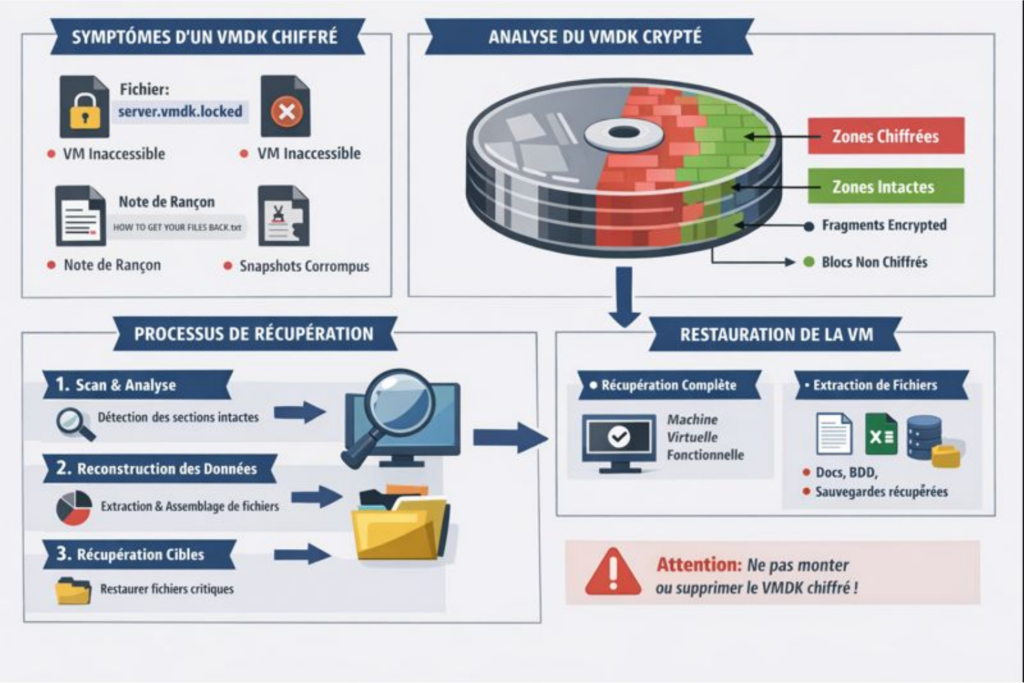
VMDK encrypted by ransomware
1️⃣ Symptoms of a ransomware-encrypted VMDK
VMDK files (Virtual Machine Disk) are virtual disks used by VMware and other virtualization solutions. When a ransomware targets them:- File extension modification Example: .vmdk → .vmdk.locked, .vmdk.anubis, .vmdk.crypt The ransomware renames the file to indicate that it has been encrypted.
- Virtual machine becomes inaccessible
The VM no longer boots. VMware or vSphere will display errors such as:
- “VMware cannot open the virtual disk”
- “Failed to open the virtual disk: the file is corrupted or encrypted”
- Visible corruption in snapshots Associated snapshots may become unusable if the ransomware also encrypts .vmsn or .vmsd files.
- Presence of ransom notes In the same folder, a text or HTML file indicates the ransom amount, contact details, and payment instructions.

2️⃣ Impact on data recovery
Data recovery depends heavily on the extent of the encryption and the available backups:- If the ransomware only encrypted the VMDK
- It is impossible to mount or access the VMs directly.
- Standard recovery tools (Recuva, R-Studio, Stellar) do not work because the content is encrypted.
- Only an intact backup or a specialized tool for recovering ransomware-encrypted files can restore the data.
- If fragments or snapshots are corrupted
- The VMDKs may be partially recoverable.
- Virtual machines may boot, but some applications or databases will be corrupted.
- Impact on time and complexity
- The process is long and delicate, as it often involves:
- analyzing the encryption algorithm used by the ransomware,
- identifying unencrypted or partially recoverable VMDK blocks,
- rebuilding the virtual disk structure (VMDK descriptor + data)
- Full recovery: several hours to several days for a single 100 GB to 1 TB VMDK depending on complexity.
- Recovery may fail completely if:
- the VMDK was fully overwritten by a wiping software
- The encryption surface is too extensive.
- The process is long and delicate, as it often involves:
3️⃣ Critical points to remember
- Never attempt to mount an encrypted VMDK: risk of further corruption (always make copies before any manipulation).
- Do not delete the file or attempt formatting: every byte is crucial for recovery.
- Priority to offline backups: if a Veeam, ESXi, Hyper-V snapshot or backup exists and was not reached by the ransomware, it is the best recovery source.
- Specialized tools: some data recovery companies have software capable of:
- analyzing the encrypted VMDK,
- rebuilding partially intact blocks,
- recovering critical files even without full decryption.